





QWERTY vs. Dvorak vs. Colemak Keyboard Layouts: A Modern Comparison
 May 10, 2025|
QWERTY vs. Dvorak vs. Colemak Keyboard Layouts: A Modern Comparison
Posted on May 10, 2025 by Zaidtek Electronic - Andy
If you're shopping for a wireless keyboard or looking to improve typing efficiency, understanding the differences between QWERTY, Dvorak, and Colemak layouts can help you make an informed decision. While QWERTY is the global default, both Dvorak and Colemak offer alternative designs aimed at faster and more ergonomic typing. In this article, we explore each layout's origins, structure, and benefits-especially for wireless keyboard users.
1. QWERTY: The Traditional Keyboard Layout
The QWERTY layout was invented in the 1870s by Christopher Latham Sholes to prevent jamming in early typewriters. Despite being less efficient by modern standards, it became the universal standard and remains the default on nearly all computer and wireless keyboards.
The QWERTY home row includes:
A, S, D, F, J, K, L, ;
However, only three of the most commonly used letters (A, S, D) appear on this row, which can increase finger movement and reduce typing efficiency.
Top 10 most frequent English letters (by usage):
E, T, A, O, I, N, S, H, R, D
Although QWERTY isn't optimized for speed or comfort, its popularity makes it hard to replace.


2. Dvorak: Designed for Typing Efficiency
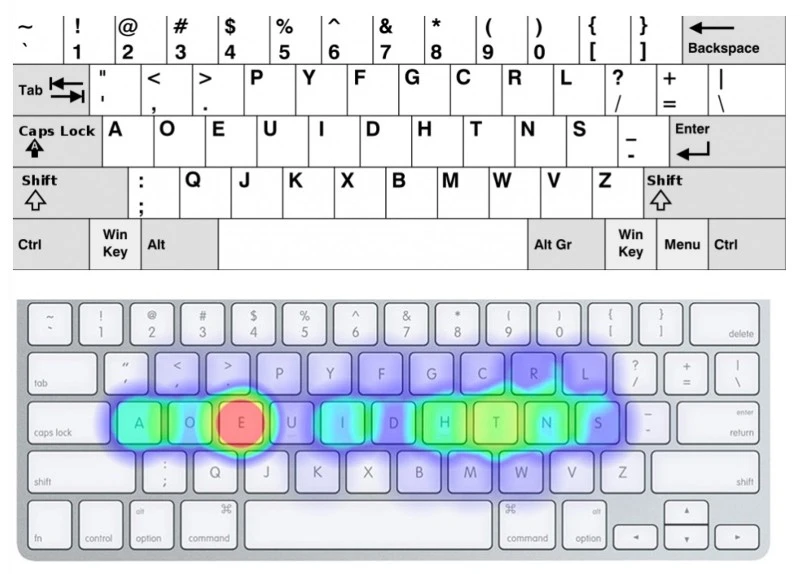
Developed in the 1930s by Dr. August Dvorak, this layout was created to improve typing speed and accuracy. It places the most frequently used vowels and consonants on the home row, minimizing finger movement.
Dvorak home row includes:
A, O, E, U, H, T, N, S
The layout also places common punctuation in more accessible locations, which benefits touch typists. While there's no definitive proof that Dvorak is faster than QWERTY, studies suggest it may reduce typing fatigue and improve accuracy over time.
Setup Tip:
To use the Dvorak layout, you can change your keyboard settings in Windows or macOS. If using a physical wireless keyboard, consider swapping keycaps for visual alignment.
3. Colemak: A Modern Upgrade for QWERTY Users
Introduced in 2006 by Shai Coleman, Colemak was designed as a balance between familiarity and efficiency. It retains much of the QWERTY layout but rearranges key positions to reduce finger strain and increase typing speed.
Colemak home row includes:
A, R, S, T, D, H, N, E, I, O
The design emphasizes minimal disruption for QWERTY users while enhancing ergonomics. Unlike Dvorak, Colemak keeps most punctuation and shortcut keys in their original positions, making it easier for new users to adapt.


Installation Note:
Colemak isn't natively supported on all Windows systems, but you can install it via colemak.com or use third-party tools. For wireless keyboards, reassigning key functions may require firmware-level support or remapping software.
Which Layout is Faster?
Although anecdotal evidence supports Dvorak and Colemak as more efficient, most competitive typists-including world record holder Anthony "Chak" Ermolin-still use QWERTY. The widespread use of QWERTY limits data on alternative layouts, but as awareness grows, adoption of Dvorak and Colemak may increase, especially among younger typists and professional keyboard users.
Which Keyboard Layout Should You Choose?
| Layout | Best For | Learning Curve | Compatibility |
|---|---|---|---|
| QWERTY | General users, default layout | None | Universal |
| Dvorak | Typists seeking efficiency and ergonomics | Moderate | Built-in OS support |
| Colemak | Transitioning from QWERTY, long-term comfort | Moderate | Requires software setup |
If you're using a wireless keyboard and want better comfort or speed, consider experimenting with Dvorak or Colemak. While the transition takes effort, the long-term benefits-especially reduced strain and increased accuracy-can be worthwhile.
QWERTY remains the global standard for keyboards, including most wireless keyboard models. However, Dvorak and Colemak offer compelling advantages for those looking to improve typing performance. Whether you're a casual user or a professional typist, understanding these layouts can help you choose the right keyboard for your needs.
At Zaidtek Electronic Technology (Xiamen) Co., Ltd., we provide OEM wireless keyboards tailored to global markets. If you're sourcing custom keyboards with QWERTY, Dvorak, or Colemak layouts, contact us to explore our manufacturing solutions.